
Pinterest Adds Mentions and Notifications to Mobile App
Categories: Blog
 When it comes to social media, every platform from Facebook to LinkedIn has worked continually to improve their mobile apps, making them easier for users to manage and navigate. Pinterest, the popular link and image sharing social platform, is no exception. Unlike the dramatic changes brought with updates like Facebook Timeline, Pinterest’s changes don’t get in the way of pinning favorite recipes or dream vacation spots. In fact, pinners are pretty pleased with the convenient features added to the iOS and Android apps, which include push notifications, tagging and search suggestions.
For those of you new to Pinterest, here’s the low-down. Launched in March 2010, Pinterest is a virtual pin board where users can “pin” pictures, links and videos of what interests them to boards. The social-sharing site allows Pinterest users, or “pinners”, to save pictures from the Internet, articles, blogs, etc. all in one place. For example, if you are interested in travel, you can create a “Bucket List” board and pin pictures of the destinations you want to visit someday. As you can imagine, the possibilities for boards and pins are endless.
As a huge fan, I add to my Pinterest boards daily. Occasionally, I scroll through my pins, looking for that article I meant to read or recipe I am finally ready to try. Suddenly, I would notice that a friend or follower had commented on a pin I added months ago. Without taking the time to look back through the content of my boards, I never would have known the comment even existed! I would quickly respond back to the comment, but would wonder, since I didn’t know my friend’s comment existed, would my comment also go unnoticed?Now, through push notifications, Pinterest alerts users when someone comments on their pins, ensuring that no comment is ignored again due to lack of visibility.

The new Pinterest Mobile App Dashboard includes suggested search, push notifications and external website pinning.
For the social media enthusiasts out there, Pinterest’s tagging feature is similar to how Facebook allows users to tag friends in their statuses and post comments. When finding something on Pinterest that a fellow pinner would find interesting, users can tag that person by selecting the @ sign and then typing out their name in a comment. Also, just as on Facebook, once tagged that person will receive a notification alerting them that they have been mentioned by another pinner. This feature may be small, but it’s one more way Pinterest is making their platform more interactive for their audience.
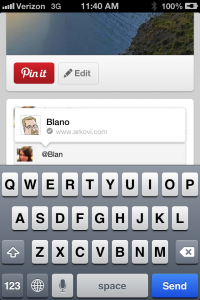
Easily tag friends in a comment by selecting the @ sign and then typing out their names.
Even better than the tagging feature, Pinterest’s search suggestions are extremely helpful for the pinner looking for recommended business reads or DIY home project tips. With the new updates now live, the app showcases a drop down menu, similar to Google Search’s suggestions, of what it thinks you are searching for. To begin a new search, simply tap the magnifying glass symbol and start typing.
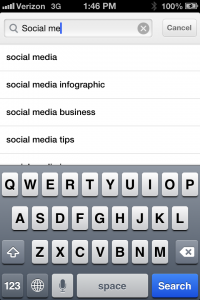
Pinterest's new suggested search makes finding pins easier than ever!
Last but not least, is an update that answers the question every pinner has asked at one time or another: How do I pin directly from an outside website? Mobile users can now pin from external websites using the “+” button at the bottom of the screen. Simply type in the URL you would like to pin. So, when you’re surfing the web and find a great webpage you would love to pin, now you can!

Pinners can now pin from external websiteas using the "+" button.
What makes Pinterest so unique is that, unlike posting what going on in your life, users can create visual illustratrations of their personalities, organizing and creating content showcasing their interests, hobbies and inspirations. With the new platform capabilities, now is the perfect time to start pinning for yourself, experiencing the difference Pinterest has to offer.
No comments yet.